When a conventional faucet stops working, a worn cartridge or blocked aerator may be responsible. A touchless model adds batteries or an adapter, a sensor, wiring, a control box, and an electrically operated valve. That changes the diagnostic process. Successful touchless faucet troubleshooting means working out whether the faucet failed to detect your hand, failed to open its valve, or simply cannot deliver water.
Begin with the checks below before dismantling anything. Refer to the manufacturer’s instructions.
Start by Separating Sensor Problems From Water Problems
Move your hand through the sensor’s intended detection area. Watch for an indicator light, if fitted, and listen for a click from the valve box beneath the sink. Check whether the manual handle operates the faucet. On certain models, the handle must be open even when the sensor controls the flow; others have a dedicated manual bypass.
No response at all suggests a power or sensing issue. A light or click without water points toward the supply, a blockage, or the solenoid valve. Consult the model’s chart for indicator-light meanings.
Touchless Faucet Not Working: Check the Power First
Replace Weak Batteries and Inspect Connections
Open the battery holder and check the batteries’ orientation, condition, and contact points. Replace the complete set with the type recommended by the manufacturer. Look for corrosion or a loose battery-pack plug. If the faucet uses mains power, check that its approved adapter is securely connected and that the outlet has power.
Under the sink, inspect accessible sensor and power cables for loose connectors, pinching, or visible damage. With dry hands, reconnect plugs only as directed by the manual. Never open a sealed controller or substitute an incompatible power supply.
Check the Handle and Water Supply
Make sure the faucet handle is set to the operating position specified by the manufacturer. Confirm the hot and cold isolation valves beneath the sink are open. If nearby taps also have no water, investigate the household supply rather than the sensor.
Fix Sensor Faucet Problems and False Activations
A sensor covered with grime may fail to recognise movement. Gently clean its window with a soft cloth using the cleaning method recommended for the finish and sensor. Remove soap bottles, dishcloths, and other objects from the sensing zone. Wave your hand at the recommended distance, then withdraw it completely before trying again.
For example, a kitchen faucet that activates unexpectedly while you drain a steaming saucepan may be detecting steam or an object near the spout. Move the pan, clear the surrounding area, and retest. A sensor that began acting strangely after a power interruption might need the manufacturer’s reset procedure.
Do not confuse motion detection with touch activation. Touch faucet troubleshooting can involve electrical contact and insulation issues that do not apply to an infrared hands-free sensor. Confirm your model.
Why Does a Touchless Faucet Shut Off Unexpectedly?
Some automatic faucets have a built-in maximum run time to prevent accidental flooding. If the water stops after a predictable interval, check whether that is normal for your model. You may need to move your hand fully out of the sensing area before reactivating the flow.
If it cuts out almost immediately, replace weak batteries, secure loose plugs, and clean the sensor. Intermittent flow despite consistent sensor activation can also suggest a solenoid or water-supply restriction.
What Causes Weak Flow or Sputtering?
A working sensor does not guarantee a clear water path. Compare the hot and cold flow, and see whether other fixtures have the same low pressure. Mineral deposits inside an aerator or spray head can weaken or distort the stream. Clean removable parts according to the manufacturer’s directions and keep track of seals and washers.
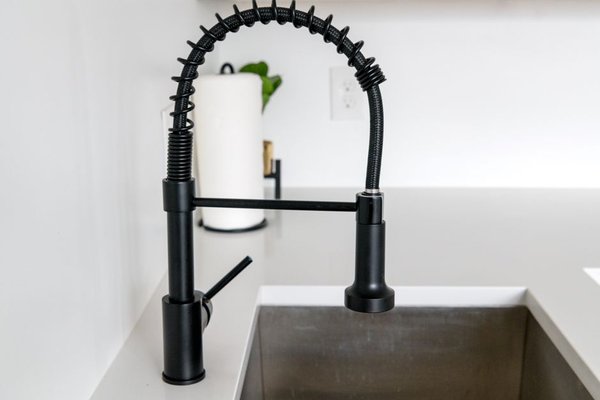
On a pull-down kitchen faucet, check the hose for kinks. Some electronic models have serviceable filters near the inlet or valve box. Turn off the water before removing a filter or opening any plumbing connection, and never disconnect a pressurised hose. Our cleaning a faucet aerator guide covers this common flow restriction in more detail.
What to Do When the Water Will Not Turn Off
Remove anything close to the sensor and check the handle. If the faucet keeps running, close the under-sink supply valves immediately. Do not assume removing batteries will stop the water: depending on the system and valve position, a powerless solenoid may remain open.
After stopping the flow, check for damaged or loose accessible connections and follow the model’s reset instructions. A stuck solenoid, faulty controller, or mechanical valve failure may require professional service. The usual fixes in a guide to fixing a dripping faucet are not always suitable for an electronic valve that remains open.
Reset the Faucet Electronics Correctly
Resetting may help when the sensor works inconsistently after a battery change or interruption, but the sequence varies. For certain Moen MotionSense versions, the instructions call for unplugging both power and data cables, waiting, then reconnecting them in a specified order with the sensing area clear. Other models have different procedures.
Find the exact model number on your paperwork or an under-sink label. Follow its steps and allow any startup cycle to finish before testing. Avoid guessing at bypass procedures or swapping hose connections based on instructions for another faucet.
When Automatic Faucet Repair Requires New Parts
Persistent failure after power, sensor, flow, and reset checks can indicate a defective solenoid, controller, or sensor assembly. Leaks from the valve box and damaged wiring are reasons to stop troubleshooting. Turn off water and power before any manufacturer-approved servicing, and contact a qualified plumber when connections or electronics are unsafe to handle.
Photograph the model label, record any indicator flashes, and note whether you hear the valve click. This information helps support staff identify the correct replacement and check warranty coverage. Our kitchen faucet low water pressure guide may help rule out ordinary plumbing restrictions first.
Frequently Asked Questions
Why is my touchless faucet not working after changing batteries?
The batteries may be installed incorrectly, the holder might be unplugged, or the sensor may be blocked or disabled. Check the handle and supply valves, then perform the model-specific reset if recommended.
Can a touchless faucet work without electricity?
Some models provide a manual operating or bypass option, but others depend on their electronic valve. Consult the manufacturer’s instructions. Removing the batteries is not a universal way to switch to manual operation.
Why does my automatic faucet turn on by itself?
Nearby objects, steam, a dirty sensor, unstable power, or a control fault may cause unintended activation. Clear the sensing zone and check connections before resetting.
Does low water pressure mean the sensor is faulty?
Not usually when the faucet activates normally. Check the aerator, spray head, shutoff valves, and approved inlet filters before suspecting the electronics.
Conclusion
Approach touchless faucet troubleshooting as two connected systems: an electronic signal and a physical water path. Check power, cables, the handle, and sensing conditions first; then inspect water supply and blockages. If the correct reset fails or the valve box leaks, model-specific professional help is safer than taking the controller apart.